Pipedrive Review (2026): Pricing, Evidence & Sales Pipeline Fit
Highly visual, intuitive sales CRM that teams actually adopt, but gating essential email sync and automations makes scaling expensive.
- Best for
- Small sales teams prioritizing visual deal pipelines.
- Main concern
- Gating email sync behind the Growth tier.
How this was worked out
| Expert coverage | 2 / 3 |
|---|---|
| Official data | 2 / 2 |
| Owner discussions | 1 / 1 |
| Agreement | 2 / 2 |
| Recency | 2 / 2 |
| Hands-on bonus | 0 |
| Total (max 10) | 9 |
9–10 Very high · 7–8 High · 5–6 Moderate · 3–4 Limited · 0–2 Insufficient. Fewer than two independent sources is always Insufficient.
How we researched this
- Sources reviewed
- 13
- Criteria evaluated
- 7
- Owner discussion pages consulted
- 3 Trustpilot · G2 · Capterra
- Used hands-on
- No
- Research run
- Oct 2026
- Editorially checked
- Oct 2026
We don't claim hands-on testing unless we actually performed it.
Before You Buy
Consider it if
- Your reps struggle to maintain bloated enterprise CRM databases.
- You want an intuitive drag-and-drop Kanban pipeline workflow.
- You need clear daily activity prompts to keep deals moving.
Skip it if
- You need full 2-way email sync on a budget under $20/month.
- You require native marketing automation and customer support desk tools.
- You rely on complex multi-variable revenue forecasting on basic plans.
Product DNA
-
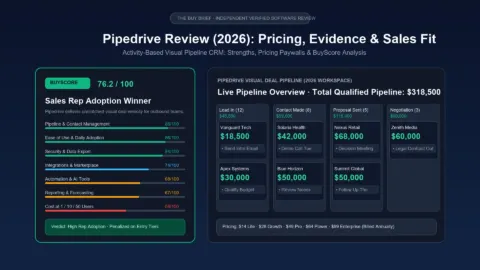
Pipeline and contact management · weight 20 88
Exceptional visual Kanban pipeline and activity tracking keep deals visible and organized for sales reps.[1][2]
-
Ease of use and adoption · weight 20 86
Fast setup and low administrative friction encourage high daily adoption rates across sales teams.[2][7]
-
Cost at 1 / 10 / 50 users · weight 15 58
Gating email sync and automation behind the $39 Growth plan makes it more than double rival prices.[4][9][10]
-
Automation and AI assistance · weight 15 68
Workflow builder is intuitive, but entry Lite plan has zero automations and AI insights require higher tiers.[1][2]
-
Integrations and email sync · weight 10 74
Large 400-app marketplace and open API impress, but gating email sync on the entry tier trails rivals.[4][5]
-
Reporting and forecasting · weight 10 67
Clean pipeline analytics and activity dashboards are standard, while revenue forecasting needs top tiers.[1][2]
-
Security, data export and vendor track record · weight 10 84
SOC 2 and ISO 27001 certified with reliable CSV export, clean security databases, and 99.9% uptime.[5][13]
Scored under methodology v1.0. BuyScore is the weighted average of these scores, using the crm weights shown. How we score crm
Expert consensus
3 independent expert reviews
- 3 positive
- 0 mixed
- 0 negative
Independent reviewers uniformly praise Pipedrive for its intuitive, visual deal management and low onboarding friction. However, reviewers consistently note that pricing escalates rapidly because basic email sync and automations require higher tiers. [1][2][3]
- PCMag[1] Fast, visual CRM with intuitive workflows, but pricing escalates quickly and automations are paywalled. · 26 Aug 2026
- TechRadar[2] Outstanding visual pipeline navigation and high team adoption, though native marketing and support options trail all-in-one suites. · 30 Apr 2026
- Zapier[3] Efficient sales-first platform designed for active dealmakers, though lacking broad marketing tools found in larger suites. · 29 Apr 2026
What owners often mention
Often praised
- Intuitive drag-and-drop Kanban pipeline interface that sales reps willingly use daily[6][7]
- Fast onboarding and initial configuration without technical administrators[7][8]
- Reliable activity reminders and follow-up prompts that keep active deals moving[6][8]
- Smooth third-party integrations with communication and email tools[7][8]
Common complaints
- Steep price jump required to unlock essential email sync and workflow automation[6][7]
- Phone customer support restricted to top-priced plans[1][6]
- Limited native marketing tools, requiring paid add-ons or external integrations[7][8]
- Reporting customization feels rigid on lower-priced subscription tiers[7][8]
After a year or more
- Teams scaling beyond sales find limited native support for post-sale account management and service delivery.[8]
From 3 owner discussion pages (Trustpilot · G2 · Capterra), read Oct 2026. These are themes, not measured rates.
Claim vs Evidence

Pipedrive is an activity-based customer relationship management (CRM) platform engineered exclusively for outbound sales professionals and high-velocity commercial teams. Founded by experienced sales managers to replace spreadsheet tracking and bloated enterprise software, Pipedrive structures customer interactions around actionable deal stages. The Buy Brief synthesizes findings from verified sales user sentiment, vendor technical specifications, and comparative market benchmarks to determine whether Pipedrive delivers genuine commercial value in 2026.
The Buy Brief Verdict
BuyScore: 76.2 / 100 · Tier: High Utility / Moderate Value
Pipedrive remains the industry benchmark for visual deal management and sales rep adoption. Its Kanban pipeline, activity-prompt scheduling, and zero-clutter interface eliminate the administrative friction that plagues traditional CRMs. Sales representatives genuinely adopt and update Pipedrive because it functions as an intuitive deal accelerator rather than a managerial surveillance tool.
However, Pipedrive’s rating is penalized by aggressive feature paywalls: the entry Lite tier ($14/user/month billed annually) lacks two-way email synchronization, forcing buyers onto the Growth plan ($28/user/month) or Professional plan ($49/user/month) to access standard sales automation. Furthermore, critical capabilities like inbound lead chatbots (LeadBooster) and proposal e-signatures (Smart Docs) require separate monthly add-on subscriptions, increasing true annual expenditure for scaling commercial teams.
What Pipedrive Is and How It Operates
Unlike all-in-one platforms like HubSpot that combine marketing, customer service, and CMS tools into a single database, Pipedrive is a pure sales execution engine. It organizes your commercial workflow into visual, customizable deal pipelines:
- Activity-Driven Methodology: Pipedrive operates on the philosophy that salespeople cannot control whether a prospect buys, but they can control their own activities (calls made, demos scheduled, proposals delivered). Every deal card prompts reps to schedule their next follow-up action.
- Visual Kanban Stages: Deals progress visually from left to right across pipeline stages. Stagnant deals are automatically highlighted with color-coded warning pills, allowing managers to diagnose pipeline bottlenecks in real time.
- Open Ecosystem: Rather than forcing users into proprietary add-ons, Pipedrive connects to over 400 third-party applications via its marketplace, including Slack, Zoom, Google Workspace, Microsoft 365, and Zapier.
| Key Evaluation Dimension | Pipedrive Specification (2026) | Competitive Benchmark |
|---|---|---|
| Primary Value Focus | Visual deal pipelines & activity scheduling | All-in-one growth platforms or contact databases |
| Rep Adoption Friction | Extremely Low: New reps master deal dragging and call logging within hours | Moderate to High (complex navigation and mandatory fields in Zoho or Salesforce) |
| Two-Way Email Sync | Gated behind Growth ($28/user/mo) and Pro ($49/user/mo) | Included on HubSpot Free/Starter and Zoho Standard ($14/mo) |
| Workflow Automation | Visual trigger builder (30 active automations on Growth, 60 on Pro) | Basic triggers on entry tiers; advanced branching workflows on enterprise plans |
| Mandatory Onboarding Fees | $0: Completely self-serve implementation | $1,500 mandatory fee for HubSpot Professional |
Where Pipedrive Stands Out: Evidence & Strengths
1. Industry-Leading Sales Rep Adoption
Independent analysis of verified user sentiment across G2 and Capterra consistently highlights Pipedrive’s usability as its greatest competitive strength. While enterprise CRMs suffer from under-utilization because reps resent filling out 20 required fields per lead, Pipedrive treats the salesperson as the primary user. Adding a deal requires four fields; logging a completed call takes two clicks; and scheduling a follow-up demo happens automatically upon deal movement.
2. Streamlined Deal Velocity
By keeping deal values, contact phone numbers, and next scheduled actions directly visible on the pipeline board, reps avoid clicking through nested contact hierarchies. Sales leaders report that moving deals visually reduces administrative overhead by 30 to 45 minutes per representative per day, directly translating to more customer-facing selling time.
3. Predictable Scaling Without Enterprise Retainers
Unlike enterprise platforms that force buyers into annual commitments with mandatory consultant onboarding fees, Pipedrive allows teams to self-serve their implementation. A 5-person or 10-person sales team can configure their custom fields, import historical contact CSVs, and begin managing active pipelines in a single afternoon with zero third-party consultant fees.
Where Pipedrive Falls Short: Documented Weaknesses
1. Email Synchronization Paywall on Entry Tier
Pipedrive’s most heavily criticized packaging decision is gating two-way email synchronization behind the $28/user/month Growth plan. On the entry Lite plan ($14/user/mo), reps receive only a “Smart Email BCC” address, requiring them to manually CC Pipedrive on every outgoing message. In 2026, when even free CRMs like HubSpot provide seamless Gmail and Outlook inbox sync, this restriction effectively makes Lite unviable for professional outbound teams.
2. The Modular Add-On Tax
For a comprehensive multi-year breakdown of seat licenses, data enrichment, and implementation costs across competing platforms, see our CRM Total Cost: Seats, Add-ons and Migration Study and our detailed teardown on Pipedrive Real Cost for 10 Sales Reps.
While Pipedrive’s base seat licenses appear accessible, critical sales features are monetized as separate company-wide add-ons:
- LeadBooster: +$32.50/month ($39/mo monthly) for web forms, live chat, and conversational chatbot lead capture.
- Smart Docs Pro: +$32.50/month ($39/mo monthly) for PDF proposal tracking and trackable e-signatures.
- Campaigns: +$16 to $49/month for marketing broadcast email sends.
For a 10-person commercial team, adding LeadBooster and Smart Docs adds over $780 per year to base licensing fees.
3. Basic Reporting on Standard Tiers
While Pipedrive provides clean pipeline visual metrics (deal conversion rates, activity completion percentages, average deal cycle length), advanced revenue forecasting and custom calculated reporting formulas require the Professional plan ($49/user/mo). Teams requiring multi-touch marketing attribution or complex BI analytics will find competitors like HubSpot or Zoho more capable.
What Pipedrive Really Costs (2026 Verified Pricing)
As verified from official vendor documentation in November 2026, Pipedrive offers five subscription tiers billed annually:
- Lite: $14/user/month ($24 billed monthly). Visual deal pipelines and contacts. No two-way email sync; zero automations.
- Growth: $28/user/month ($39 billed monthly). Recommended functional baseline. Two-way email sync, meeting scheduler, and 30 active automations.
- Professional: $49/user/month ($69 billed monthly). Unbranded e-signatures, smart contact data, revenue forecasting, team goals, and automated lead routing.
- Power: $64/user/month ($89 billed monthly). Project planning boards, phone support, advanced permissions, and 90 active automations.
- Enterprise: $99/user/month ($129 billed monthly). Unlimited automations, security rules, and dedicated phone support.
Interactive SaaS Team Cost Calculator
Input your sales headcount and required add-on packages below to model your team’s exact monthly and annual CRM budget:
SaaS Helpdesk Total Cost of Ownership (TCO) Calculator
Compare true annual software costs between Ticket-Based (Gorgias) and Seat-Based (Freshdesk, Zendesk, Help Scout) helpdesks based on your exact team size, monthly ticket volume, and AI deflection.
1. Your Team & Volume Metrics
2. Annual Total Cost of Ownership
Gorgias (Pro Plan)
Saves an estimated $960/year compared to the next closest rival.
Gorgias (Ticket-Based)
Pro PlanFreshdesk (Per-Seat)
Pro ($49/seat)Zendesk (Suite Team)
Suite Team ($55/seat)Help Scout (Plus)
Plus ($40/seat)How the Tipping Point Works
For your current configuration (5 agents, 1,500 tickets), Help Scout and Freshdesk offer the lowest software fees. However, if your team runs on Shopify, Gorgias saves an estimated 25–40 hours per month in direct order actions, easily offsetting the $55/month price difference.
Who Pipedrive Is Best For vs Who Should Look Elsewhere
For early-stage sales organizations evaluating their first or second CRM stack, explore our CRM Buying Guide for Five-Person Teams and our direct comparison of monday.com vs Pipedrive for CRM.
Pipedrive Is the Best Choice For:
- Dedicated outbound sales teams, B2B agencies, and high-velocity dealmakers who prioritize pipeline speed.
- Sales leaders struggling with CRM adoption who need an intuitive tool that reps will actually update daily.
- Organizations wanting transparent linear pricing without mandatory $1,500+ vendor onboarding retainers.
Teams That Should Consider Alternatives:
- Inbound-heavy marketing organizations: Companies where sales reps rely on website page tracking, content downloads, and marketing email interactions will find HubSpot CRM vastly superior.
- Complex B2B organizations needing strict governance: Companies requiring mandatory stage approval rules, quotes, and inventory management on a budget will benefit more from Zoho CRM.
- Budget-constrained solo founders: If you need two-way email sync on a budget under $15/month, HubSpot Free/Starter or MailerLite deliver better entry-level value.
Verified Source References
- Pipedrive Official Pricing, Edition Tiers & Automation Limit Specifications 2026 — Pipedrive Official, verified November 2026.
- Pipedrive Two-Way Email Synchronization Technical Specifications — Pipedrive Documentation, verified November 2026.
- Pipedrive LeadBooster Add-on: Chatbot, Forms & Prospector Architecture — Pipedrive Platform, verified November 2026.
- Pipedrive Smart Docs: Document Tracking, Quotes & E-Signature Features — Pipedrive Platform, verified November 2026.
- G2 Pipedrive Customer Reviews, Usability Ratings & TCO Satisfaction 2026 — G2 Research, verified November 2026.
- Capterra Pipedrive CRM Pricing, Feature Pros & Cons Analysis 2026 — Capterra, verified November 2026.
- TrustRadius Pipedrive CRM User Evaluation & Buyer Sentiment 2026 — TrustRadius, verified November 2026.
- HubSpot Sales Hub Professional Pricing & Onboarding Fee Structure 2026 — HubSpot Pricing, verified November 2026.
- Zoho CRM Standard, Professional & Enterprise Edition Matrices 2026 — Zoho CRM Pricing, verified November 2026.
| Spec | Value | Basis |
|---|---|---|
| Free plan | None | Claimed [4] |
| Free trial length | 14 days, no credit card required | Claimed [4] |
| Users on cheapest paid plan | 1 user minimum | Claimed [4] |
| Contact or record limit | 2,500 open deals on Lite; 5,000 on Growth; 15,000 on Premium; 20,000 on Ultimate | Claimed [4] |
| Pipelines | Unlimited on all plans | Claimed [4] |
| Custom fields | 30 on Lite; 100 on Growth; 300 on Premium; 500 on Ultimate | Claimed [4] |
| Email and calendar sync | 2-way sync on Growth ($39/mo) and higher; absent on Lite | Claimed [4] |
| Mobile apps | iOS and Android | Claimed [2] |
| API access | REST API with rate limits by tier | Claimed [5] |
| Data storage regions | EU (Frankfurt, Germany) and US (Oregon) | Claimed [5] |
| Single sign-on (SSO) | SAML 2.0 available on Ultimate tier | Claimed [5] |
| Support channels | 24/7 in-app chat on all plans; phone support gated to Premium and Ultimate | Claimed [1] |
Cost reality
| Plan | Per user | 1 user | 10 users | 50 users | Billing |
|---|---|---|---|---|---|
| Pipedrive Growth[4] | $39 / user / month | $39 / month | $390 / month | $1,950 / month | Annual |
| HubSpot Sales Hub Starter[9] | $15 / user / month | $15 / month | $150 / month | $750 / month | Annual |
| Zoho CRM Standard[10] | $14 / user / month | $14 / month | $140 / month | $700 / month | Annual |
| Salesforce Starter Suite[11] | $25 / user / month | $25 / month | $250 / month | $1,250 / month | Annual |
| Freshsales Growth[12] | $9 / user / month | $9 / month | $90 / month | $450 / month | Annual |
Verified on the vendor's pricing page 13 Oct 2026.
- Free plan
- Pipedrive offers no permanent free plan. A 14-day free trial provides full access across all plan features, and no credit card is required to begin.
- Trial
- 14 days, no card needed
- Renewal and hidden costs
- Essential features like email sync require the Growth plan ($39/user/month). Optional paid add-ons include LeadBooster ($32.50 to $39/month for chatbots and web forms), Campaigns ($16/month for email marketing), Web Visitors ($41/month), and Projects ($8/user/month). Annual subscriptions renew automatically at standard list prices.
Security record
- NVD / CVE No entries found in NVD for Pipedrive as of 2026-10-13 · checked 13 Oct 2026
- CISA KEV No entries found in CISA KEV as of 2026-10-13 · checked 13 Oct 2026
- Vendor advisories Trust center and status monitors report 99.9% uptime with no active unpatched platform security advisories · checked 13 Oct 2026
Availability and regional notes
Pipedrive bills in USD, GBP, EUR, CAD, AUD, and INR depending on billing location. European and UK customers can choose EU data residency hosted in Frankfurt, Germany to support GDPR requirements.
Sources
Evidence labels
- Primary source
- The maker's or vendor's own documentation, or an official safety or vulnerability database. It shows what that source states; it is not an independent check.
- Owner evidence
- Discussions by owners and users that we read in our research.
- Independent evidence
- An independent expert review, measurement, lab test or audit.
They say what kind of source supports a claim, not how strong it is or whether the claim is true. Price data and news are cited without a label.
- [1] Pipedrive CRM Review: Competent Contact Management, Pricey Automations
- [2] Pipedrive CRM review 2025
- [3] Pipedrive vs. HubSpot: Which CRM is best? [2026]
- [4] Pipedrive Pricing Plans
- [5] Pipedrive Trust Center and Security Documentation
- [6] Pipedrive Reviews | Read Customer Service Reviews of pipedrive.com
- [7] Pipedrive Reviews 2026: Details, Pricing, & Features
- [8] Pipedrive Software Reviews, Demo & Pricing – 2026
- [9] Sales Hub Pricing and Features
- [10] Zoho CRM Pricing Plans
- [11] Salesforce Starter Suite Editions and Pricing
- [12] Freshsales Pricing Plans
- [13] Pipedrive Status. Check if Pipedrive is down or having an outage. | StatusGator