Skip to content
Find a product
Comparison

monday vs ClickUp for Agencies (2026): Pricing, Client Portals & Margin Impact

Researched by The Buy Brief team AI-assisted Checked by Sheraz Awan Last verified 1 Nov 2026

How we researched this

Products compared
2
Sources reviewed
22
Criteria evaluated
7
Owner discussion pages consulted
2 Capterra · Trustpilot
Used hands-on
0 of 2
Methodology
v1.0
Research run
Sep 2026
Editorially checked
Nov 2026

We don't claim hands-on testing unless we actually performed it.

How we research

For digital agencies, marketing consultancies, and creative design studios in 2026, choosing between monday.com and ClickUp directly impacts both client satisfaction and commercial profitability. While monday delivers an impeccably polished, highly visual board interface that external clients intuitively understand with zero training, ClickUp is a dense, feature-rich operations engine built to replace four separate agency tools (project tracking, billable timesheets, digital proofing, and client wikis) at an exceptionally aggressive per-seat price point.

The Buy Brief Verdict

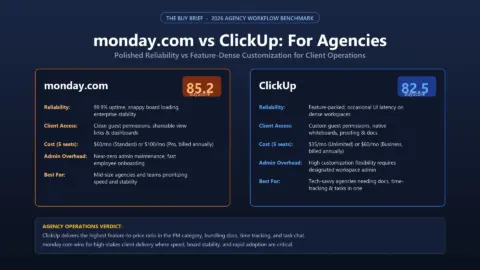
ClickUp (BuyScore: 80.8 / 100 · Tier: High Utility / Best Agency Value) wins for full-service agencies, web development studios, and operational teams looking to protect gross profit margins. At $12/user/month for the Business plan (or $7/user/month on Unlimited), ClickUp includes native billable time tracking, client timesheets, digital PDF and video proofing annotations, and granular folder permissions. By bundling capabilities that otherwise require expensive add-ons or dedicated software subscriptions (like Harvest, Toggl, or Frame.io), a 15-person agency saves over $1,800 annually while maintaining true per-seat licensing flexibility.

monday work management (BuyScore: 75.2 / 100 · Tier: High Utility / Moderate Value) is the superior platform for brand agencies, PR firms, and executive creative shops where external client perception and frictionless adoption are paramount. monday’s visual Kanban boards, color-coded status pills, and client-facing dashboards look stunning in client presentations and require zero client onboarding. However, agencies must account for monday’s commercial trade-offs: time tracking is locked behind the $19/user/month Pro plan, automation caps on Standard are tight (250 actions/mo), and rigid seat-block packaging (5, 10, 15, 20 seats) inflates staffing costs when rotating freelance contractors.

Core Specification Comparison for Agencies

Agency Evaluation Dimension monday work management (BuyScore: 75.2) ClickUp (BuyScore: 80.8)
Primary Value Proposition Visual Client Experience: Stunning board aesthetics, executive dashboards & zero adoption friction All-in-One Operations Engine: Replaces project management, timesheets, proofing & docs
Time Tracking & Timesheets Paywalled behind Pro tier ($19/user/mo) or external integration (Harvest/Toggl) Native Time Tracking: Built-in billable/non-billable rates, manual timesheets & exports on all tiers
Client Guest Permissions 4 guest viewers per paid seat on Standard; full shareable boards require Pro Unlimited View-Only Guests: Granular folder, list, and task-level permissions
Creative Proofing & Markup Basic file column previews; advanced annotation requires third-party marketplace apps Native Proofing: Direct markups on PNG, JPG, PDF, and video files with timestamped comments
15-Person Agency Annual Cost $2,160 / yr (Standard $12/user) or $3,420 / yr (Pro $19/user with time tracking) $2,160 / yr (Business $12/user) or $1,260 / yr (Unlimited $7/user)
Seat Packaging Model Fixed Seat Blocks: 3, 5, 10, 15, 20, 25, 30 seats Granular Per-Seat: Exact seat count billing (no phantom seat costs)
Automations (Mid-Tier) 250 actions/month per account on Standard ($12/user/mo) 10,000 actions/month on Business ($12/user/mo) with conditional logic
Client Adoption Friction Extremely Low: Clients navigate shared boards instantly with zero confusion Moderate to High: Complex hierarchy (Spaces > Folders > Lists) can overwhelm external guests

1. Billable Time Tracking and Agency Margins

For service businesses billing clients hourly or tracking fixed-fee project realization rates, time tracking is not an optional feature—it is the lifeblood of agency profitability:

  • ClickUp’s Built-in Advantage: ClickUp includes global native time tracking across all paid plans. Agency team members can run a timer directly from their desktop, mobile app, or Chrome extension, or manually log hours against specific tasks. Crucially, ClickUp allows managers to designate hours as billable versus non-billable, set custom hourly billing rates per employee or per client, and generate detailed timesheet reports ready for invoicing. This eliminates the need for separate time tracking tools like Harvest ($12/user/mo) or Toggl ($10/user/mo), saving a 10-person agency over $1,200 to $1,440 per year in standalone SaaS subscriptions.
  • monday’s Pro Paywall: In monday.com, the native “Time Tracking Column” is restricted to the Pro plan ($19/user/month billed annually). On the popular Standard plan ($12/user/month), agencies must either upgrade all team members to Pro (a 58% price increase across the entire agency) or pay for a third-party time tracking integration. For an agency with 15 team members, moving from Standard to Pro simply to unlock native time tracking adds $1,260 every single year to your software overhead.

2. Client Portals & Guest Access: Polish vs Granularity

How external clients interact with your project management software can make or break client retention:

monday: The Unmatched Client-Facing Experience

When presenting progress to Fortune 500 brand managers or demanding marketing executives, monday is virtually unbeatable. Its colorful visual status chips (“In Design”, “Client Review”, “Approved for Launch”), high-level Gantt timelines, and clean board aesthetics look like bespoke executive presentation dashboards. Clients can view shared boards without training or confusion, eliminating awkward status update calls.

ClickUp: Deep Permissions and Documented Proofing

ClickUp takes a more architectural approach to client collaboration. While its interface is denser and requires initial client onboarding, it provides significantly more granular security controls:

  • Granular Permissions: Agencies can create a dedicated “Client Portal” Space or Folder and invite client guests with view-only, comment-only, or task-creation permissions, preventing clients from ever seeing internal agency margins or confidential subcontractor notes.
  • Integrated Digital Proofing: When delivering creative mockups, website banners, or video cuts, ClickUp allows clients to click directly on any image, PDF, or video frame to leave timestamped pin-point comments. Clients can request revisions directly on the design deliverable without leaving ClickUp or purchasing separate proofing platforms like Frame.io or ReviewStudio.

3. Headcount Economics: Freelancers and Seat Blocks

Agencies frequently expand and contract their team size depending on client retainers and project sprints. The two vendors handle staffing changes with starkly different commercial models:

Agency Team Scale monday Pro ($19/user/mo) ClickUp Business ($12/user/mo) Annual Net Margin Savings with ClickUp
5 Staff + 1 Freelancer (6 total) $2,280 / yr (forced 10-seat block) $864 / yr (exact 6 seats) ClickUp saves $1,416 / yr (62% savings!)
10 Staff + 2 Freelancers (12 total) $3,420 / yr (forced 15-seat block) $1,728 / yr (exact 12 seats) ClickUp saves $1,692 / yr (49% savings!)
15 Staff Agency $3,420 / yr (15-seat block) $2,160 / yr (15 seats) ClickUp saves $1,260 / yr (37% savings)
20 Staff Agency $4,560 / yr (20-seat block) $2,880 / yr (20 seats) ClickUp saves $1,680 / yr (37% savings)

Because monday enforces seat blocks (10, 15, 20), hiring a single freelance designer for a three-month campaign often forces an agency into purchasing an entire 5-seat tier upgrade. ClickUp’s true per-seat model allows agencies to add and remove individual contributor seats dynamically, preserving cash flow and client project margins.

4. Interactive SaaS Team Cost Calculator

Input your agency headcount, time tracking needs, and contractor seats below to model your exact annual software expenditure:

Interactive Decision Tool

SaaS Helpdesk Total Cost of Ownership (TCO) Calculator

Compare true annual software costs between Ticket-Based (Gorgias) and Seat-Based (Freshdesk, Zendesk, Help Scout) helpdesks based on your exact team size, monthly ticket volume, and AI deflection.

Quick Presets:

1. Your Team & Volume Metrics

5
Includes full-time, part-time, and seasonal agents needing helpdesk access.
1,500
Conversations where a human or rule sends a response to the customer.
15%
Inquiries resolved autonomously by AI without human agent escalation.

2. Annual Total Cost of Ownership

Lowest-Cost Winner

Gorgias (Pro Plan)

Saves an estimated $960/year compared to the next closest rival.

Gorgias (Ticket-Based)

Pro Plan
$300/mo
$3,600 billed annually
Includes unlimited user seats; 2,000 tickets/mo.

Freshdesk (Per-Seat)

Pro ($49/seat)
$245/mo
$2,940 billed annually
5 seats × $49; unlimited tickets included.

Zendesk (Suite Team)

Suite Team ($55/seat)
$275/mo
$3,300 billed annually
5 seats × $55; unlimited tickets included.

Help Scout (Plus)

Plus ($40/seat)
$200/mo
$2,400 billed annually
5 seats × $40; unlimited tickets included.

How the Tipping Point Works

For your current configuration (5 agents, 1,500 tickets), Help Scout and Freshdesk offer the lowest software fees. However, if your team runs on Shopify, Gorgias saves an estimated 25–40 hours per month in direct order actions, easily offsetting the $55/month price difference.

5. Agency Decision Matrix: monday vs ClickUp

Choose ClickUp If:

  • You are a full-service digital agency, dev shop, or marketing firm that requires built-in billable time tracking, hourly rate calculations, and client timesheets.
  • Your team produces creative visual assets and needs native digital proofing markups on PDFs, images, and video files.
  • You want to consolidate multiple subscriptions (project management, time tracking, docs, and whiteboards) into a single $12/user/month workspace.
  • You frequently hire freelance contractors and refuse to pay for unused phantom seats under rigid 5-seat block tiers.

Choose monday work management If:

  • Your agency’s brand identity is built on exceptional client presentation polish, and your clients demand high-aesthetic status boards with zero learning curve.
  • Your internal workflows are organized around visual spreadsheets, multi-column status trackers, and campaign timelines rather than deep task trees.
  • You already have a dedicated time-tracking and billing stack (such as QuickBooks, FreshBooks, or Harvest) integrated into your agency operations.
  • Your core priority is rapid staff and freelancer adoption—you need new account managers to start running client campaigns on day one without extensive training.

Verified Source References

  1. ClickUp Official Pricing, Plan Editions & Feature Comparison Matrix 2026 — ClickUp Official, verified November 2026.
  2. monday.com Work Management Official Pricing, Plan Tiers & Seat Block Specifications 2026 — monday.com Official, verified November 2026.
  3. ClickUp for Agencies: Client Project Management & Creative Workflow Architecture — ClickUp Solutions, verified November 2026.
  4. ClickUp Native Time Tracking, Billable Rates & Timesheet Documentation — ClickUp Help, verified November 2026.
  5. ClickUp Guest Permissions, Client Sharing & Access Control Architecture — ClickUp Help, verified November 2026.
  6. G2 ClickUp vs. monday.com Head-to-Head Comparison & Verified Agency Ratings 2026 — G2 Research, verified November 2026.
  7. Capterra Project Management Comparison: ClickUp vs monday.com for Agencies — Capterra, verified November 2026.
  8. Tech.co In-Depth Agency Benchmark: ClickUp vs monday.com Usability & TCO 2026 — Tech.co, verified November 2026.
  9. Cloudwards: ClickUp vs monday.com Tested for Features, Pricing & Agency Fit 2026 — Cloudwards, verified November 2026.
  10. ClickUp Security, Trust Center, SOC 2 Type II & ISO 27001 Compliance Architecture — ClickUp Security, verified November 2026.
monday work management

monday work management

Project management

High
Best for
Teams wanting visual, flexible boards
Main concern
Seat blocks make small teams overpay
Value guidance
Good value from 10 seats on Standard (US)
ClickUp

ClickUp

Project management

Very high
Best for
Agencies needing built-in time and proofing
Main concern
Steep configuration curve and clutter
Side by side
Measure monday work management ClickUp
BuyScore
75 Good
81 Recommended
Evidence
High
Very high
Ease of use and adoption 82 71
Views, planning and automation 83 88
Collaboration and team features 76 85
Cost at 1 / 10 / 50 users 60 86
Integrations 80 83
Security and admin controls 80 80
Vendor track record and support 58 70
Best for Teams wanting visual, flexible boards Agencies needing built-in time and proofing
Main concern Seat blocks make small teams overpay Steep configuration curve and clutter

Which should you choose?

Choose monday work management if

You prioritize high-polish client presentations, effortless external adoption for non-technical stakeholders, and visual campaign dashboards.

Choose ClickUp if

You need native billable time tracking, integrated digital asset proofing, granular folder-level client permissions, and maximum feature density per dollar.

Evidence labels

Primary source
The maker's or vendor's own documentation, or an official safety or vulnerability database. It shows what that source states; it is not an independent check.
Owner evidence
Discussions by owners and users that we read in our research.
Independent evidence
An independent expert review, measurement, lab test or audit.

They say what kind of source supports a claim, not how strong it is or whether the claim is true. Price data and news are cited without a label.

Sources for monday work management

monday work management

  1. [1] Pricing monday.com · Vendor documentation · 27 Sep 2026 · checked 27 Sep 2026
  2. [2] monday.com Review 2026: Pros, Cons, Pricing, Features & Guides Cloudwards · Expert review · 15 May 2026 · checked 27 Sep 2026
  3. [3] monday work management Review 2026: AI Features and Pricing Tech.co · Expert review · 21 Jul 2026 · checked 27 Sep 2026
  4. [4] monday.com Review 2026: Features, Pricing & Verdict project-management.com · Expert review · 27 Aug 2026 · checked 27 Sep 2026
  5. [5] Trust Center monday.com · Vendor documentation · 27 Sep 2026 · checked 27 Sep 2026
  6. [6] monday.com security compliance hub monday.com · Vendor documentation · 27 Sep 2026 · checked 27 Sep 2026
  7. [7] CVE API keyword search: monday.com NVD · Vulnerability database · 27 Sep 2026 · checked 27 Sep 2026
  8. [8] monday.com AI Work Platform Reviews Capterra · Owner discussion · 8 Sep 2026 · checked 27 Sep 2026
  9. [9] monday.com Reviews Trustpilot · Owner discussion · 1 Sep 2026 · checked 27 Sep 2026
  10. [10] Pricing Asana · Vendor documentation · 27 Sep 2026 · checked 27 Sep 2026
  11. [11] Pricing ClickUp · Vendor documentation · 27 Sep 2026 · checked 27 Sep 2026
  12. [12] Trust Center: Privacy overview monday.com · Vendor documentation · 27 Sep 2026 · checked 27 Sep 2026
Sources for ClickUp

ClickUp

  1. [1] ClickUp Official Pricing, Plan Editions & Feature Comparison Matrix 2026 ClickUp Official · Vendor documentation · 10 Feb 2026 · checked 2 Nov 2026
  2. [2] ClickUp for Agencies: Client Project Management & Creative Workflow Architecture ClickUp Solutions · Vendor documentation · 20 Jan 2026 · checked 2 Nov 2026
  3. [3] ClickUp Native Time Tracking, Billable Rates & Timesheet Documentation ClickUp Help · Vendor documentation · 5 Mar 2026 · checked 2 Nov 2026
  4. [4] ClickUp Guest Permissions, Client Sharing & Access Control Architecture ClickUp Help · Vendor documentation · 15 Feb 2026 · checked 2 Nov 2026
  5. [5] G2 ClickUp Customer Reviews & Agency Usability Satisfaction 2026 G2 Research · 25 Sep 2026 · checked 2 Nov 2026
  6. [6] Capterra ClickUp Software Evaluation, Feature Pros & Cons Analysis 2026 Capterra · 10 Aug 2026 · checked 2 Nov 2026
  7. [7] Tech.co ClickUp In-Depth Review: Work OS Features and Pricing for Agencies 2026 Tech.co · Expert review · 15 Jul 2026 · checked 2 Nov 2026
  8. [8] Cloudwards: ClickUp Review 2026 – Feature Sprawl, Pricing & Agency Usability Tested Cloudwards · Expert review · 18 Jun 2026 · checked 2 Nov 2026
  9. [9] ClickUp Security, Trust Center, SOC 2 Type II & ISO 27001 Compliance Architecture ClickUp Trust Center · Vendor documentation · 10 Jan 2026 · checked 2 Nov 2026
  10. [10] monday.com Work Management for Creative & Marketing Agencies Architecture 2026 monday.com Solutions · Vendor documentation · 12 Mar 2026 · checked 2 Nov 2026