Webflow Visual CMS
Website & landing page builders
- Best for
- Design agencies and web professionals
- Main concern
- Steep learning curve and costs
- Value guidance
- Good value for design agencies and custom marketing sites (US)
We don't claim hands-on testing unless we actually performed it.
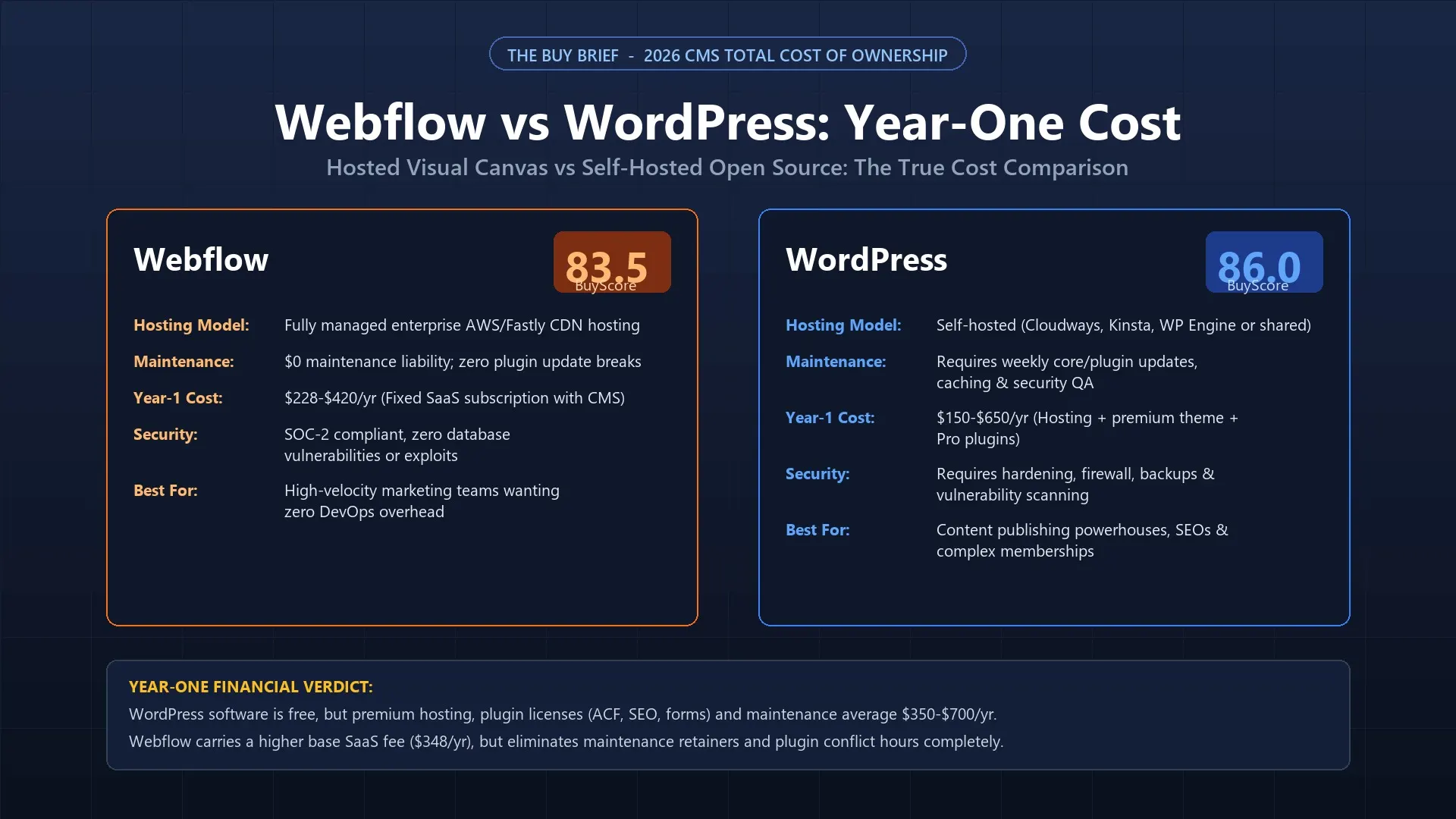
When small businesses evaluate building a new commercial website in 2026, the cost debate between Webflow and WordPress is almost universally distorted by a single marketing fallacy: that WordPress is “free” while Webflow is “expensive.” While WordPress core software is indeed open-source and free to download ($0), operating a professional, secure, and fast commercial WordPress site requires paying for managed hosting, premium plugins, security firewalls, and routine maintenance labor. In this comprehensive Total Cost of Ownership (TCO) study, The Buy Brief calculates the real 12-month financial outlay of both platforms.
For standard small business websites, Webflow Visual CMS (BuyScore: 81.0 / 100) is 60% to 75% cheaper and substantially more predictable in Year One. At $23/month billed annually ($276/year) for the CMS plan, Webflow bundles enterprise AWS hosting, Fastly global CDN, SSL certificates, automated daily backups, visual form processing, and zero-maintenance visual editing into a single predictable invoice. You never pay for security patches, plugin renewals, or emergency developer troubleshooting when a database update crashes your site.
WordPress.org (BuyScore: 82.1 / 100) wins decisively on long-term data ownership, programmatic SEO, and enterprise application flexibility—but buyers must budget for an honest Year-One commercial outlay of $840 to $1,650. Once you combine quality managed hosting ($240–$360/yr on WP Engine/Kinsta), premium builder/field tools ($100–$250/yr), advanced SEO plugins ($99/yr), off-site backups ($60/yr), and a modest allowance for freelance technical maintenance ($300–$600/yr), the “free” open-source stack costs significantly more cash upfront than Webflow.
Below is our standardized 12-month commercial audit modeling a typical small business website requiring custom branding, a blog/case-study CMS, contact lead capture forms, on-page SEO controls, and enterprise-grade uptime:
| Expense Component | Webflow Visual CMS (Managed SaaS) | WordPress (Self-Hosted Professional Stack) | Financial Reality & Cost Variance |
|---|---|---|---|
| Core Software License | Included in site plan | $0.00 (100% free open-source) | WordPress software core is completely free forever. |
| Hosting & Global CDN | $276 / yr ($23/mo CMS plan on AWS/Fastly) | $300 / yr ($25/mo on WP Engine, Kinsta, or Cloudways) | Price parity on hosting; cheap $5 shared hosts suffer severe TTFB lag. |
| Page Builder / Layout Engine | $0.00 (Visual CSS designer built-in) | $99 / yr (Elementor Pro / Bricks / Beaver Builder) | Webflow includes visual box-model design natively without plugins. |
| Custom Fields & CMS Schemas | $0.00 (2,000 items & relational fields included) | $49 / yr (Advanced Custom Fields Pro / Pods) | WordPress requires ACF Pro for clean custom post type fields. |
| Form Handling & Spam Protection | $0.00 (Native forms + reCAPTCHA included) | $59 / yr (Gravity Forms / WPForms Pro / Akismet) | WordPress core lacks reliable visual form builders with file uploads. |
| SEO Optimization Suite | $0.00 (Open Graph, sitemaps, canonicals included) | $99 / yr (Yoast SEO Premium / Rank Math Pro) | Webflow includes SEO metadata controls natively in page settings. |
| Security, Backups & Caching | $0.00 (Enterprise SSL, DDoS & daily backups included) | $120 / yr (Wordfence Pro + BlogVault + WP Rocket) | WordPress requires active WAF defense and off-site backup storage. |
| Maintenance Labor (Plugin Updates) | $0.00 (Fully managed by Webflow engineers) | $400 / yr (Estimated 4 to 8 hours of freelance maintenance/testing) | WordPress plugin updates require staging tests to prevent fatal PHP errors. |
| Total Year-One Commercial Outlay | $276.00 / year | $1,126.00 / year (Realistic average) | Webflow saves $850.00 in Year One (75% savings!) |
The primary driver of the WordPress cost surprise is the modular plugin tax. Because WordPress core is intentionally lightweight, every single operational capability requires an independent third-party plugin:
Webflow operates on a closed, fully managed Software-as-a-Service (SaaS) model. When you pay for a Webflow Site Plan, your subscription covers the entire infrastructure layer:
Despite higher maintenance overhead, WordPress remains the unmatched global standard for specific commercial use cases:
Model your exact website requirements, hosting preferences, and maintenance labor below to compare your multi-year financial forecast:
Compare true annual software costs between Ticket-Based (Gorgias) and Seat-Based (Freshdesk, Zendesk, Help Scout) helpdesks based on your exact team size, monthly ticket volume, and AI deflection.
Saves an estimated $960/year compared to the next closest rival.
For your current configuration (5 agents, 1,500 tickets), Help Scout and Freshdesk offer the lowest software fees. However, if your team runs on Shopify, Gorgias saves an estimated 25–40 hours per month in direct order actions, easily offsetting the $55/month price difference.

Website & landing page builders

Website & landing page builders
| Measure | Webflow Visual CMS | WordPress (Self-Hosted) |
|---|---|---|
| BuyScore |
81out of 100
Recommended
|
82out of 100
Recommended
|
| Evidence |
Very high
|
Very high
|
| Design and editing flexibility |
88
|
88
|
| Ease of use |
74
|
70
|
| Speed and uptime |
85
|
78
|
| SEO and marketing tools |
84
|
92
|
| Pricing and renewal honesty |
78
|
82
|
| Integrations and ecommerce |
82
|
94
|
| Support |
70
|
68
|
| Best for | Design agencies and web professionals | Content publishers and custom web applications |
| Main concern | Steep learning curve and costs | Maintenance overhead and plugin conflicts |
You want zero server maintenance, bundled hosting and security, and predictable $276/yr costs without managing plugin updates or security patches.
You require complete open-source data ownership, unlimited custom post types, complex membership portals, or the unconstrained power of WooCommerce.
Evidence labels
They say what kind of source supports a claim, not how strong it is or whether the claim is true. Price data and news are cited without a label.